Compliance Notice: This page documents SiteCalc® Pro LLC's SMS consent and opt-in process for customers and compliance purposes.
Overview
SiteCalc® Pro LLC provides SMS communication tools that allow contractors to communicate with their customers regarding:
- Estimates & Quote Approvals
- Appointments & Scheduling Updates
- Project Status Notifications
- Invoice Delivery
- Customer Service Communications
- Responses to Customer Inquiries
SMS Consent Process
To receive SMS communications through SiteCalc® Pro:
- 1
The customer provides consent directly to the contractor during a phone call, estimate visit, service appointment, or in-person meeting.
- 2
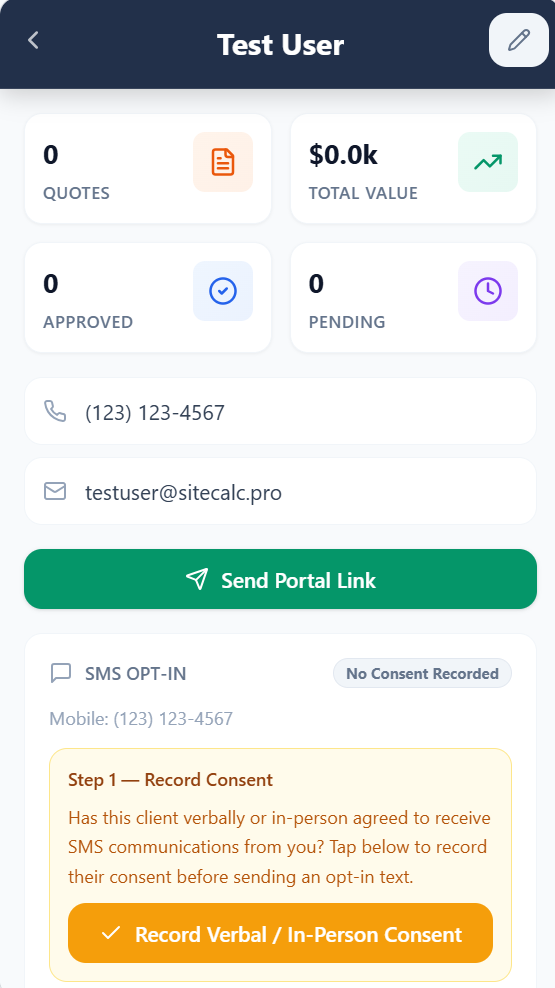
The contractor records the customer's consent within SiteCalc® Pro's consent management system.
- 3
The contractor sends an SMS opt-in invitation through SiteCalc® Pro.
- 4
The customer must reply YES or START to confirm enrollment.
- 5
SiteCalc® Pro automatically updates and maintains the customer's SMS consent status based on the customer's response.
- 6
SMS communications may then be sent by the contractor.
- 7
Customers may opt out at any time by replying STOP.
Opt-In Flow — Screenshots
The following screenshots show the exact opt-in flow as it appears to contractors inside the SiteCalc® Pro client management portal. Contractors access this interface after logging in, navigate to a client record, and use the SMS messaging panel to record consent and send the opt-in invitation.
The contractor navigates to a client's profile page and opens the SMS messaging tab.
Before sending any SMS, the contractor must check a consent acknowledgment box.
As Shown in SiteCalc® Pro Client Portal
SMS Consent
I confirm this client has provided verbal or in-person consent to receive SMS messages about their estimates, appointments, project updates, and invoices from my company.
Button is only active after consent checkbox is checked
The customer receives the opt-in invitation by SMS and replies YES to confirm. The system then updates their status automatically.
SMS Thread as Shown in Client Record After Opt-In
SiteCalc® Pro: Hi John, this is ABC Landscaping. Reply YES to receive SMS updates regarding estimates, appointments, project updates, invoices, and service communications. Msg & Data Rates May Apply. Reply STOP to opt out.
Sent by contractor
YES
Customer reply — triggers opt-in confirmation
Compliance Summary: No SMS messages are sent without (a) the contractor recording verbal/in-person consent via a required checkbox, and (b) the customer replying YES to confirm enrollment. The opt-in status is tracked per-client and displayed in the contractor's dashboard at all times.
Example Opt-In Message
The following opt-in message is sent to customers:
Example Confirmation Message
After the customer replies YES, this confirmation is sent automatically:
Opt-Out Instructions
Customers may stop receiving SMS messages at any time by replying any of the following keywords:
Once opted out, no further SMS messages will be sent unless the customer opts in again.
Help Instructions
Customers may request assistance at any time by replying:
Example help response sent automatically:
Privacy
SMS consent is not shared with third parties or affiliates for marketing purposes. Mobile phone numbers and SMS consent information are used solely to:
- Provide requested messaging services
- Maintain consent records
- Process opt-in and opt-out requests
- Deliver customer communications
SiteCalc® Pro LLC does not sell, rent, disclose, transfer, or distribute mobile phone numbers or SMS consent information to third parties for promotional or marketing purposes.
Contact
For questions regarding SMS communications, please contact:
© 2026 SiteCalc® Pro. All rights reserved.